


AllTick API Market Data Integration Guide
As a professional financial market data provider, AllTick is committed to providing stable and accurate real-time market data to trading platforms, quantitative teams, and fintech companies worldwide…
As a professional financial market data provider, AllTick is committed to providing stable and accurate real-time market data to trading platforms, quantitative teams, and fintech companies worldwide. AllTick's real-time market data API supports multiple data access methods, including HTTP and WebSocket, meeting users' data access needs in different scenarios. Whether you are building trading strategies, analyzing market trends, or developing high-frequency trading systems, AllTick can provide reliable technical support and flexible integration solutions. This article will provide a detailed introduction to how tointegrate with AllTick's market data API. We provide free trial accounts. Simply register to start your trial. You are welcome to test it.
1. Market Data Test
Before registering an account, you can test our API on the website first. Click the image above to go directly to the testing page. Simply enter the stock symbol you want to query in the product code field and click Request to receive real-time data. For example, in the image above, we requested the candlestick data for Ping An Insurance (601318.SH), and the price data returned is shown below. In addition to A-shares, you can also request prices for Hong Kong and U.S. stocks. You can try entering 700.HK (Tencent Holdings in Hong Kong) or TSLA.US (Tesla in the U.S.). In thisGoogle Sheetyou can find all the instruments we support.
2. Account Registration
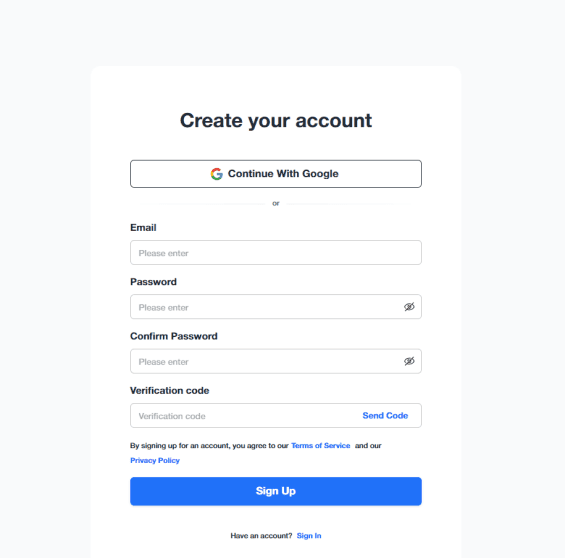
Click the image below to go directly to the registration page:
Simply enter your email address and password to complete registration; phone number verification is not required.
3. Get Token
After registration, you will be automatically redirected to the management console, where you can see your dedicated API key. Registration is now complete.
4. Integrate Market Data
We provide detailed integration documentation. You can first review the specific integration steps:
Below is an example of integrating with the AllTick API:
HTTP:
import time
import requests
import json
# Extra headers
test_headers = {
'Content-Type': 'application/json'
}
'''
# Replace "testtoken" in the URL below with your own token
'''
# K-line data request for Tencent Holdings (700.HK)
test_url1 = 'https://quote.alltick.io/quote-stock-b-api/kline?token=testtoken&query=%7B%22trace%22%20%3A%20%22python_http_test1%22%2C%22data%22%20%3A%20%7B%22code%22%20%3A%20%22700.HK%22%2C%22kline_type%22%20%3A%201%2C%22kline_timestamp_end%22%20%3A%200%2C%22query_kline_num%22%20%3A%202%2C%22adjust_type%22%3A%200%7D%7D'
# Depth tick data request for Tencent Holdings (700.HK)
test_url2 = 'https://quote.alltick.io/quote-stock-b-api/depth-tick?token=testtoken&query=%7B%22trace%22%20%3A%20%22python_http_test2%22%2C%22data%22%20%3A%20%7B%22symbol_list%22%3A%20%5B%7B%22code%22%3A%20%22700.HK%22%7D%5D%7D%7D'
# Trade tick data request for Tencent Holdings (700.HK)
test_url3 = 'https://quote.alltick.io/quote-stock-b-api/trade-tick?token=testtoken&query=%7B%22trace%22%20%3A%20%22python_http_test3%22%2C%22data%22%20%3A%20%7B%22symbol_list%22%3A%20%5B%7B%22code%22%3A%20%22700.HK%22%7D%5D%7D%7D'
# Send requests and print responses
resp1 = requests.get(url=test_url1, headers=test_headers)
time.sleep(1)
resp2 = requests.get(url=test_url2, headers=test_headers)
time.sleep(1)
resp3 = requests.get(url=test_url3, headers=test_headers)
# Decoded text returned by the request
text1 = resp1.text
print(text1)
text2 = resp2.text
print(text2)
text3 = resp3.text
print(text3)
WebSocket:
import json
import websocket # pip install websocket-client
'''
# Replace "testtoken" in the URL below with your own token
'''
class Feed(object):
def __init__(self):
self.url = 'wss://quote.alltick.io/quote-stock-b-ws-api?token=testtoken' # Enter your websocket URL here
self.ws = None
def on_open(self, ws):
"""
Callback object which is called at opening websocket.
1 argument:
@ ws: the WebSocketApp object
"""
print('A new WebSocketApp is opened!')
# Start subscribing (modified for 700.HK)
sub_param = {
"cmd_id": 22002,
"seq_id": 123,
"trace": "3baaa938-f92c-4a74-a228-fd49d5e2f8bc-1678419657806",
"data": {
"symbol_list": [
{
"code": "700.HK",
"depth_level": 5,
}
]
}
}
# If you want to run for a long time, you need to modify the code to send heartbeats periodically to avoid disconnection, please refer to the API documentation for details
sub_str = json.dumps(sub_param)
ws.send(sub_str)
print("Depth quote for 700.HK is subscribed!")
def on_data(self, ws, string, type, continue_flag):
"""
4 arguments.
The 1st argument is this class object.
The 2nd argument is utf-8 string which we get from the server.
The 3rd argument is data type. ABNF.OPCODE_TEXT or ABNF.OPCODE_BINARY will be came.
The 4th argument is continue flag. If 0, the data continue
"""
def on_message(self, ws, message):
"""
Callback object which is called when received data.
2 arguments:
@ ws: the WebSocketApp object
@ message: utf-8 data received from the server
"""
# Parse the received message
result = eval(message)
print(result)
def on_error(self, ws, error):
"""
Callback object which is called when got an error.
2 arguments:
@ ws: the WebSocketApp object
@ error: exception object
"""
print(error)
def on_close(self, ws, close_status_code, close_msg):
"""
Callback object which is called when the connection is closed.
2 arguments:
@ ws: the WebSocketApp object
@ close_status_code
@ close_msg
"""
print('The connection is closed!')
def start(self):
self.ws = websocket.WebSocketApp(
self.url,
on_open=self.on_open,
on_message=self.on_message,
on_data=self.on_data,
on_error=self.on_error,
on_close=self.on_close,
)
self.ws.run_forever()
if __name__ == "__main__":
feed = Feed()
feed.start()
5. Contact Customer Support
If you encounter any issues during integration or have any questions about our products, you can contact our customer support team at any time: