


How Can You Tell Which Stock a WebSocket Market Data Message Belongs to After Receiving It?
Learn how to identify which stock a WebSocket market data message belongs to when subscribing to multiple symbols, using message types and stock codes for reliable routing.
When developing a stock market data page, many developers quickly run into a practical problem after connecting a WebSocket: if one connection subscribes to multiple stocks and the server keeps sending market data, how does the application know which stock each message belongs to?
For example, suppose a market data page subscribes to Tencent 700.HK, Alibaba 9988.HK, and the U.S. stock AAPL.US at the same time. Once the connection is established, the server may continuously send multiple Tick messages. If the application simply reads the price from each JSON message and updates the page, it can easily end up with a situation where “the price was updated, but it was applied to the wrong stock.”
The key issue is not really the WebSocket itself. The important part is how to associate the identifier carried by each market data message with the corresponding stock state maintained by the application.
Do Not Identify a Stock by Message Order
One of the most common mistakes is assuming that because stocks were subscribed to in a particular order, incoming messages can be matched to stocks in the same order.
For example:
700.HK
9988.HK
AAPL.US
A developer may assume that the first message belongs to 700.HK and the second message belongs to 9988.HK.
This approach is unreliable.
A WebSocket is a continuous data stream. The server sends market data messages as they are generated, so the application should not determine the stock based on “which message number this is.” Different stocks can have different trading activity and update frequencies. One stock may generate several consecutive messages while another may have no new trade for a period of time.
The value the application should rely on is the stock code carried inside the message itself.
Using AllTick's stock WebSocket as an example, the latest trade price subscription uses 22004, while the server uses 22998 for real-time trade data pushes. The code field in the pushed data is an important identifier for determining the specific instrument.
For example, suppose the application receives the following message:
{
  "cmd_id": 22998,
  "data": {
    "code": "700.HK",
    "seq": "1605509068000001",
    "tick_time": "1605509068",
    "price": "651.12",
    "volume": "300",
    "turnover": "12345.6",
    "trade_direction": 1
  }
}
The application first reads:
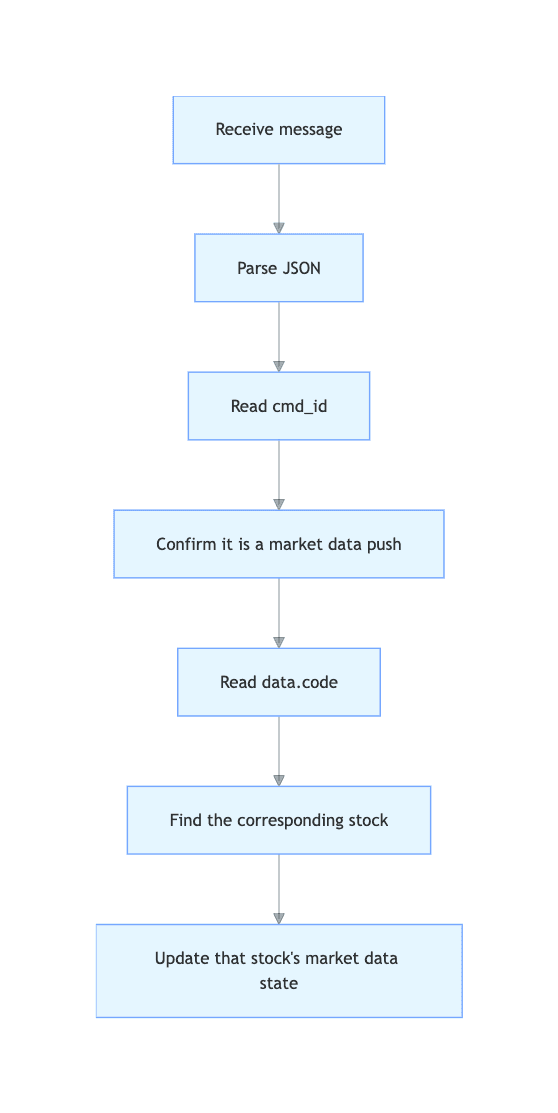
data.codeThe result is 700.HK. The application can then use this code to find the corresponding stock state and update fields such as price and volume.
The basic logic for determining which stock a WebSocket market data message belongs to can therefore be represented as:
When Subscribing to Multiple Stocks, Maintain a Code Mapping
In an actual application, I recommend creating a mapping between stock code and market data state in advance.
For example, suppose the page subscribes to:
{
  "symbol_list": [
    {"code": "700.HK"},
    {"code": "9988.HK"},
    {"code": "AAPL.US"}
  ]
}
After receiving a message, there is no need to determine which message number it is. The application can directly look up the stock using code.
In JavaScript, this can be handled as follows:
const stocks = new Map([
  ["700.HK", { name: "Tencent", price: null, volume: null }],
  ["9988.HK", { name: "Alibaba", price: null, volume: null }],
  ["AAPL.US", { name: "Apple", price: null, volume: null }]
]);

function handleMessage(rawMessage) {
  const message = JSON.parse(rawMessage);

  // Process only the latest trade price push
  if (message.cmd_id !== 22998) {
    return;
  }

  const quote = message.data;
  const code = quote.code;

  const stock = stocks.get(code);

  // Ignore unsubscribed or unknown codes
  if (!stock) {
    return;
  }

  stock.price = Number(quote.price);
  stock.volume = Number(quote.volume);

  console.log(`${code}: ${stock.price}`);
}
There is an important detail here: do not use code as the display name.
700.HK is the code used by the application to identify the market data, while the page may want to display a name such as “Tencent.” Therefore, the two should be stored separately.
const stocks = new Map([
  ["700.HK", {
    symbol: "700.HK",
    name: "Tencent",
    price: null
  }],
  ["AAPL.US", {
    symbol: "AAPL.US",
    name: "Apple",
    price: null
  }]
]);
With this structure, when data for 700.HK arrives, the application knows which object should be updated. The frontend can then decide which name should be displayed.
cmd_id and code Solve Two Different Problems
When parsing WebSocket data, it is also important not to confuse the protocol identifier with the stock code.
cmd_id is mainly used to determine “what type of message is this?”, while code is used to determine “which stock does this market data belong to?”
Using AllTick's current WebSocket protocol as an example, stock real-time trade subscriptions use 22004, with 22998 used for the corresponding server-side market data push. Order Book subscriptions use 22002, while the server uses 22999 for the corresponding push.
Therefore, if a page handles both Tick and Order Book data, the application can first route the message according to cmd_id and then use data.code to identify the specific stock:
if (message.cmd_id === 22998) {
  // Tick / latest trade data
  handleTrade(message.data);
}

if (message.cmd_id === 22999) {
  // Order Book data
  handleOrderBook(message.data);
}
This approach is safer than simply saying “if there is a price, update the stock.” A real market data system may handle more than one type of message, and additional data such as order book information or trading status may be added later.
Keep the Stock Code Consistent with the Subscription
Another detail that is easy to overlook is the format of the stock code.
Stock codes are not necessarily just numbers across different markets. For example, in AllTick's code system, Hong Kong stocks can use 700.HK, while U.S. stocks can use AAPL.US. A-share symbols also use codes with market suffixes. Before connecting, developers should confirm that the target code exists in the corresponding product list.
For this reason, the application should generally avoid converting the code into another format unnecessarily.
For example:
Subscription: 700.HK
Push: 700.HK
Map: 700.HK
Keeping these three values consistent makes the subsequent processing much simpler.
If the application maintains its own mapping between stock names, exchanges, and stock codes, that mapping should also be managed as an independent data layer rather than reconstructing the stock name every time a WebSocket message arrives.
For scenarios that require multiple stocks to be received simultaneously, AllTick provides a dedicated stock WebSocket connection and supports submitting multiple stock codes in a single subscription request. In this situation, routing messages at the application layer according to the code contained in each push message is a natural approach.
If you are developing a real-time market data dashboard, stock monitoring system, or quantitative data integration service, it is useful to separate the processing into three layers: message type identification → stock code identification → market data state update. Even if the application later grows from a few stocks to hundreds of stocks, the message-processing design does not need to be fundamentally redesigned.
AllTick's official WebSocket documentation provides protocol details for stock real-time trade and Order Book subscriptions. It can be used to verify the specific fields and message structures when implementing the integration.