


AllTick API市場データ接続ガイド
AllTickは専門的な金融市場データサービスプロバイダーとして、世界中の取引プラットフォーム、クオンツチーム、フィンテック企業に安定した正確な…
AllTickは専門的な金融市場データサービスプロバイダーとして、世界中の取引プラットフォーム、クオンツチーム、フィンテック企業に安定した正確なリアルタイム相場データを提供することに尽力しています。AllTickのリアルタイム相場APIは、HTTPやWebSocketを含む複数のデータ接続方式に対応しており、さまざまなシーンでのユーザーのデータアクセスニーズを満たします。取引戦略の構築、市場動向の分析、高頻度取引システムの開発のいずれであっても、AllTickは信頼性の高い技術サポートと柔軟な接続ソリューションを提供できます。この記事では、どのようにAllTickの相場APIに接続するかについて詳しく説明します。無料試用アカウントを提供しており、直接登録するだけですぐに試用を開始できます。ぜひお試しください。
1. 相場テスト
アカウントを登録する前に、まずウェブサイトで当社のインターフェースをテストできます。上の画像をクリックすると、テストページに直接移動できます。商品コードに照会したい株式コードを入力してリクエストをクリックするだけで、リアルタイムデータが返されます。たとえば、上の画像では中国平安(601318.SH)のK線をリクエストしており、以下が返された価格データです。A株だけでなく、香港株や米国株の価格もリクエストできます。700.HK(香港株のテンセント・ホールディングス)やTSLA.US(米国株のテスラ)を入力して試すことができます。このGoogleスプレッドシートでは、当社が対応しているすべての銘柄を確認できます。
2. アカウント登録
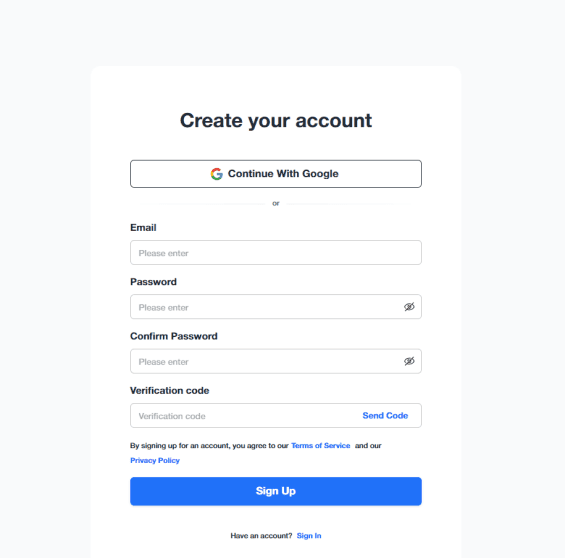
下の画像をクリックすると、登録ページに直接移動できます:
メールアドレスとパスワードを入力するだけで登録が完了し、携帯電話番号の認証は必要ありません
3. トークンの取得
登録が完了すると自動的に管理画面へ移動し、専用のAPIキーを確認できます。これで登録は完了です。
4. マーケットデータへの接続
詳細な接続ドキュメントをご用意しています。まずは具体的な接続手順をご確認ください:
以下はAllTick APIに接続する例です:
HTTP:
import time
import requests
import json
# Extra headers
test_headers = {
'Content-Type': 'application/json'
}
'''
# Replace "testtoken" in the URL below with your own token
'''
# K-line data request for Tencent Holdings (700.HK)
test_url1 = 'https://quote.alltick.io/quote-stock-b-api/kline?token=testtoken&query=%7B%22trace%22%20%3A%20%22python_http_test1%22%2C%22data%22%20%3A%20%7B%22code%22%20%3A%20%22700.HK%22%2C%22kline_type%22%20%3A%201%2C%22kline_timestamp_end%22%20%3A%200%2C%22query_kline_num%22%20%3A%202%2C%22adjust_type%22%3A%200%7D%7D'
# Depth tick data request for Tencent Holdings (700.HK)
test_url2 = 'https://quote.alltick.io/quote-stock-b-api/depth-tick?token=testtoken&query=%7B%22trace%22%20%3A%20%22python_http_test2%22%2C%22data%22%20%3A%20%7B%22symbol_list%22%3A%20%5B%7B%22code%22%3A%20%22700.HK%22%7D%5D%7D%7D'
# Trade tick data request for Tencent Holdings (700.HK)
test_url3 = 'https://quote.alltick.io/quote-stock-b-api/trade-tick?token=testtoken&query=%7B%22trace%22%20%3A%20%22python_http_test3%22%2C%22data%22%20%3A%20%7B%22symbol_list%22%3A%20%5B%7B%22code%22%3A%20%22700.HK%22%7D%5D%7D%7D'
# Send requests and print responses
resp1 = requests.get(url=test_url1, headers=test_headers)
time.sleep(1)
resp2 = requests.get(url=test_url2, headers=test_headers)
time.sleep(1)
resp3 = requests.get(url=test_url3, headers=test_headers)
# Decoded text returned by the request
text1 = resp1.text
print(text1)
text2 = resp2.text
print(text2)
text3 = resp3.text
print(text3)
WebSocket:
import json
import websocket # pip install websocket-client
'''
# Replace "testtoken" in the URL below with your own token
'''
class Feed(object):
def __init__(self):
self.url = 'wss://quote.alltick.io/quote-stock-b-ws-api?token=testtoken' # Enter your websocket URL here
self.ws = None
def on_open(self, ws):
"""
Callback object which is called at opening websocket.
1 argument:
@ ws: the WebSocketApp object
"""
print('A new WebSocketApp is opened!')
# Start subscribing (modified for 700.HK)
sub_param = {
"cmd_id": 22002,
"seq_id": 123,
"trace": "3baaa938-f92c-4a74-a228-fd49d5e2f8bc-1678419657806",
"data": {
"symbol_list": [
{
"code": "700.HK",
"depth_level": 5,
}
]
}
}
# If you want to run for a long time, you need to modify the code to send heartbeats periodically to avoid disconnection, please refer to the API documentation for details
sub_str = json.dumps(sub_param)
ws.send(sub_str)
print("Depth quote for 700.HK is subscribed!")
def on_data(self, ws, string, type, continue_flag):
"""
4 arguments.
The 1st argument is this class object.
The 2nd argument is utf-8 string which we get from the server.
The 3rd argument is data type. ABNF.OPCODE_TEXT or ABNF.OPCODE_BINARY will be came.
The 4th argument is continue flag. If 0, the data continue
"""
def on_message(self, ws, message):
"""
Callback object which is called when received data.
2 arguments:
@ ws: the WebSocketApp object
@ message: utf-8 data received from the server
"""
# Parse the received message
result = eval(message)
print(result)
def on_error(self, ws, error):
"""
Callback object which is called when got an error.
2 arguments:
@ ws: the WebSocketApp object
@ error: exception object
"""
print(error)
def on_close(self, ws, close_status_code, close_msg):
"""
Callback object which is called when the connection is closed.
2 arguments:
@ ws: the WebSocketApp object
@ close_status_code
@ close_msg
"""
print('The connection is closed!')
def start(self):
self.ws = websocket.WebSocketApp(
self.url,
on_open=self.on_open,
on_message=self.on_message,
on_data=self.on_data,
on_error=self.on_error,
on_close=self.on_close,
)
self.ws.run_forever()
if __name__ == "__main__":
feed = Feed()
feed.start()
5. カスタマーサービスに連絡
接続中に問題が発生した場合、または当社の製品についてご不明な点がある場合は、いつでもカスタマーサービスチームまでお問い合わせください: